

Who we help / Childcare

Childcare

Educators spend the day caring for other people's children, with ratios to keep and families to greet.

The responsibility is constant, and it is easy to hide how heavy that feels.

A text after the room has settled gives an adult a moment that is just for them.

This check-in is for staff.

Free 2-week pilot: Custom SMS check-ins + AI-4U, up to 10 staff, decision within 7 days.

Illustrative image of a childcare worker standing beside shelves of supplies.
Illustrative image. Not a WellbeingSolutions staff member or client.

What a reply looks like

Hi Aroha, how are you going this week? Reply Yes if you're OK, or No if you need support

No. I'm carrying more than I can hold today.

Thanks for telling us, Aroha. Someone from the support team will be in touch soon. Always remember, you are never alone.

Illustrative image of two adults talking together in a library.
Illustrative image. Not a WellbeingSolutions staff member or client.

Common pressures in Childcare

  • A full day of responsibility, then families to greet at the door.
  • Ratios and rooms that still have to run when someone is at their limit.
  • Early starts and the emotional weight of the day, easily hidden.
  • Little time that belongs to the adult, until the room has settled.

How teams use it

Educators get a Monday check-in of their own. After a hard day, the same text goes out once the room has settled. It is for the adults on staff. The next morning’s rooms are part of the service continuing, and the person who replies No is connected to support rather than left to hold the day again.

By the numbers

What support and leaders see

Example screen

Roles

NameDescription
AdministratorThis profile will have all the permissions.
Professional SupportAccess to selected features only
HR ManagerAccess to all features apart from employee replies.
Business AdminManage contacts and send check-ins.

Professional Support Permissions

ContactsOnView, Edit
Support ActionOnView, Create, Edit, Close
NotesOff
UsersOff
Professional Support sees the replies and the support record. Leaders see anonymous totals.

EXAMPLE REPORT, FICTIONAL DATA Fully customisable in Power BI

All
All
All

No. of New Cases

YearMonthCount
2025October12
2025November15
2025December9
2026January8
Example leadership report. Fictional data. Fully customisable in Power BI.
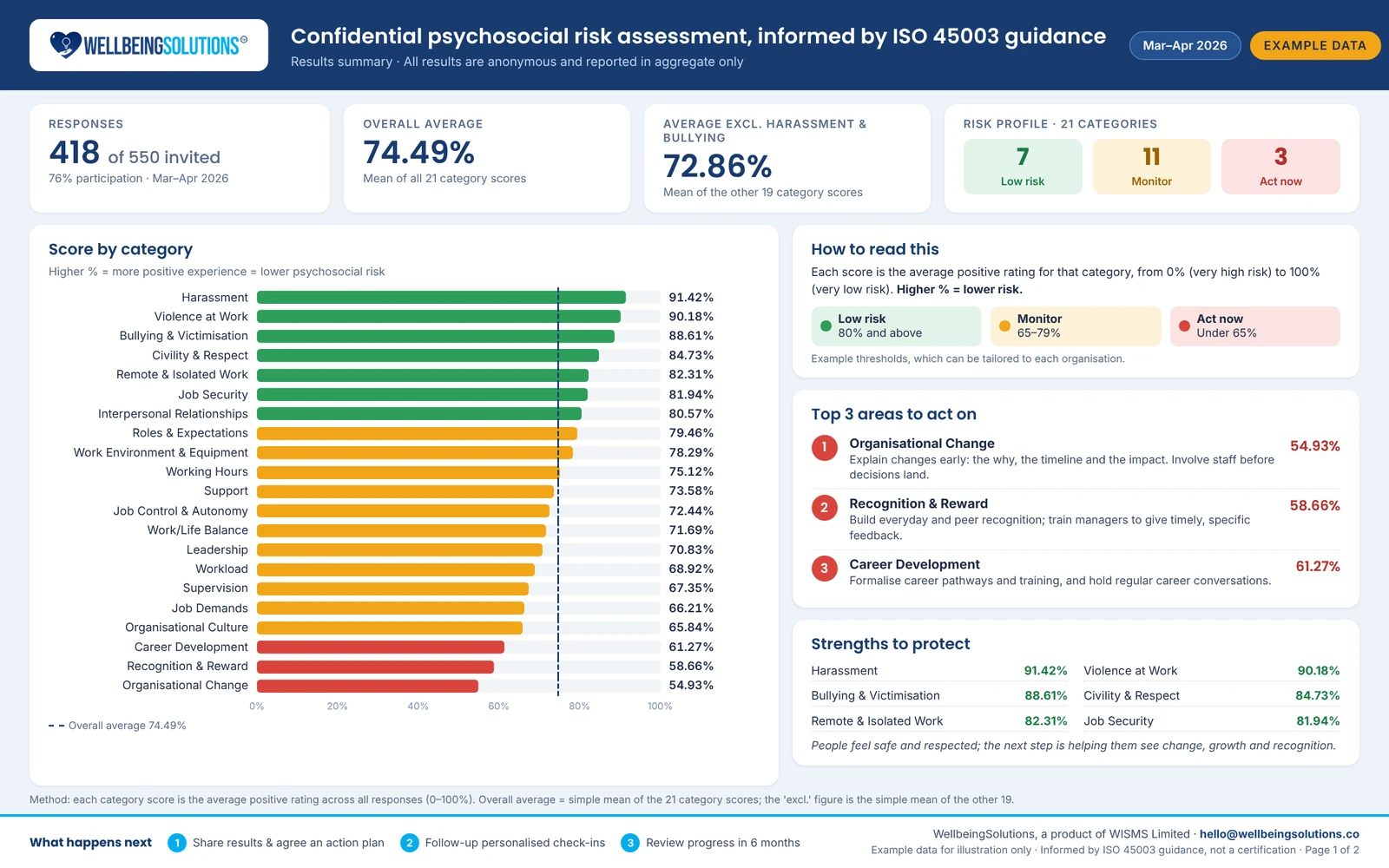
Example psychosocial assessment screen with fictional data
Example psychosocial assessment screen. Fictional data.

A small message. A clear next step.

Reach out early. Make the next step easier.

A wellbeing service only helps when people can find it, use it and trust what happens next.

  1. 01

    Check-in sent

    A proactive wellbeing check-in, or after an incident or emergency event.

  2. 02

    Replies triaged

    Replies are free for employees*, and every reply is acknowledged.

  3. 03

    Who needs help identified

    People who ask for support are flagged for follow-up.

  4. 04

    Connected to professional support

    Your preferred professional support.

*Once connected to your communication provider.

After triage

More than a text message: what happens after someone asks for help

  1. 1

    Check-in sent

    The business writes its own check-in text and sends it to staff.

  2. 2

    Instant reply and triage

    When someone replies 'No', the system sends a warm reply straight away and flags them for support.

  3. 3

    Professional support notified

    The business's professional support or EAP gets an email with the person's name, mobile number, the question asked and their answer.

  4. 4

    The full story, in confidence

    Support signs in and opens the person's profile to see their history.

  5. 5

    A conversation that captures what matters

    Support records the call in the contact section, with the person's name if they agree or anonymously if not.

  6. 6

    A clear plan

    Support creates a support action with guidance for the person and books a follow-up call.

  7. 7

    No one falls through the cracks

    If a follow-up isn't updated in time, the system escalates and alerts the business admin to assign someone else. The admin is only told the callback is overdue, never the person's details.

Get a quote

Tell us about your team.

Share a few details and we will come back to you by email about Childcare.

Get a quote

Fields marked * are required.

We use your details only to reply about this quote. Please don’t include health information.